📝 Posted on 2021-08-14T06:01:29Z
⏳ 3 min read
Create own react-redux using context api in react
Hello 👋,
In this article we are going to build own
react-reduxcontextWhy we need redux in react ?
In react we need to share data between components. It will be very difficult with react state with the help of redux we can make it simple.
Here is an example. ```javascript const Root = () => { const [label, setLabel] = useState() return
{label}
const Parent = props => {
return
const Child = props => {
return
const Subchild = ({ children, setLabel }) => { return
{children}
In the above example app has multiple levels
Root -> Parent -> Child -> SubchildRootlabelsetLabelsetLabelSolution
REDUX
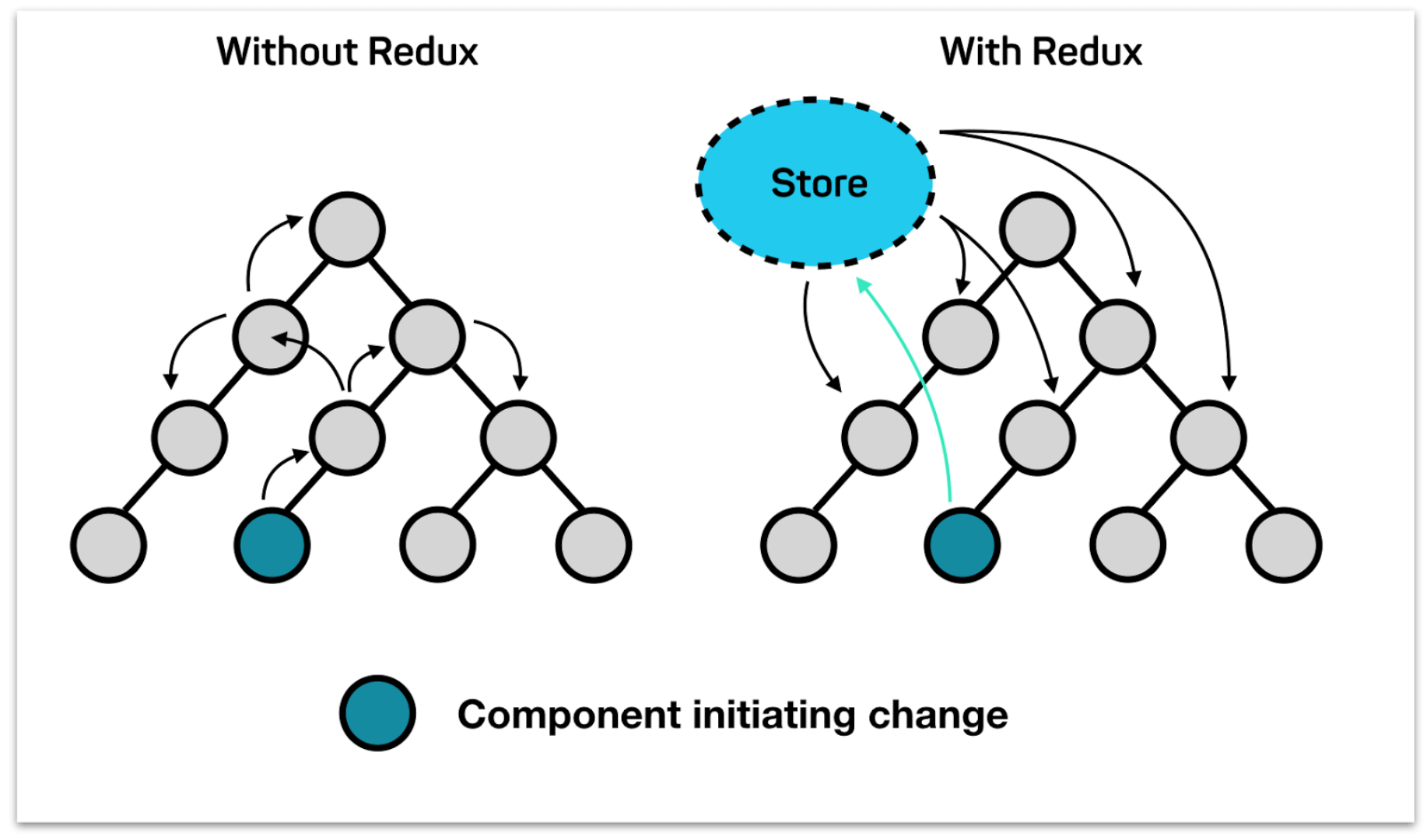
How redux helps?
Redux will maintain a store (global state) independently. We can access and mutate the redux data directly from the component. For the above problem we will link
RootSubchildRootSubchildParentChildLet's jump into development part 🚀
First we need to create context for global state
const {
  createContext,
} = require("react");

const context = createContext();

const { Provider, Consumer } = context;
We created context successfully now lets create
combineReducersconst reducer1 = (state, action) => { switch (action.type) { case "INSERT_X": return { ...state, x: action.data }; case "DELETE_X": return { ...state, x: null }; default: return { ...state }; } }; const reducer2 = (state, action) => { switch (action.type) { case "INSERT_Y": return { ...state, y: action.data }; case "DELETE_Y": return { ...state, y: null }; default: return { ...state }; } }; // zip is util function const zip = (list1, list2) => { var obj = {}; for (let i = 0; i < list1.length; i++) { obj[list1[i]] = list2[i]; } return obj; }; const combineReducers = (reducers) => { return (state, action) => { const _reducers = Object.keys(reducers); const _state = Object.keys(reducers).map((reducer) => { return reducers[reducer](state[reducer], action); }); return zip(_reducers, _state); }; };
Next we need to create
Providerconnectconst StoreProvider = ({ children }) => { const rootReducer = combineReducers({ reducer1, reducer2 }); const [state, dispatch] = useReducer(rootReducer, {}); return <Provider value={{ state, dispatch }}>{children}</Provider>; }; const connect = (mapStateTopProps, mapDispatchToProps) => { return (Component) => (props) => { return ( <Consumer> {({ state, dispatch }) => { const dispatchProps = mapDispatchToProps(dispatch); const stateProps = mapStateTopProps(state); return <Component {...props} {...stateProps} {...dispatchProps} />; }} </Consumer> ); }; };
Hook approach to mutate and access the state
const useSelector = (fn) => {
  const { state } = useContext(context);
  return fn(state);
};

const useDispatch = (fn) => {
  const { dispatch } = useContext(context);

  return dispatch;
};
Finally the code will be like this ```javascript const { useContext, createContext, useReducer, useState, useEffect } = require("react");
const context = createContext();
const { Provider, Consumer } = context;
const reducer1 = (state, action) => { switch (action.type) { case "INSERT_X": return { ...state, x: action.data }; case "DELETE_X": return { ...state, x: null }; default: return { ...state }; } };
const reducer2 = (state, action) => { switch (action.type) { case "INSERT_Y": return { ...state, y: action.data }; case "DELETE_Y": return { ...state, y: null }; default: return { ...state }; } };
const zip = (list1, list2) => { var obj = {}; for (let i = 0; i < list1.length; i++) { obj[list1[i]] = list2[i]; } return obj; };
const combineReducers = (reducers) => { return (state, action) => { const _reducers = Object.keys(reducers); const _state = Object.keys(reducers).map((reducer) => { return reducersreducer; });
};return zip(_reducers, _state);
};
const Store = ({ children }) => { const rootReducer = combineReducers({ reducer1, reducer2 });
const [state, dispatch] = useReducer(rootReducer, {});
return
export const connect = (mapStateTopProps, mapDispatchToProps) => {
return (Component) => (props) => {
return (
export const useSelector = (fn) => { const { state } = useContext(context); return fn(state); };
export const useDispatch = (fn) => { const { dispatch } = useContext(context);
return dispatch; };
export default Store; ```
We are done with redux part 👏🏻
To use this in your app wrap your root component with
StoreProviderconnectHere is sandbox link with example {% codesandbox custom-redux-vrkxg %} Thank you!!!!
🚨🚨⚠️⚠️ : Don’t use this code in production. This is just for educational purposes.
You can now extend your support by buying me a Coffee.

